

Snare drums are complex instruments and one of the most important elements of a mix behind the lead vocal. Equalization (EQ) is a helpful process in the mixing stage (or tracking stage if you’re brave enough to commit) to sculpt the sound of your snare drum. The goal is to start with a great source, such as a good drum, tuned well, muffled accordingly, played well by the drummer, and captured with a good microphone, good preamp, and solid converters. If all of those conditions are met and the snare drum blends in well with the rest of the kit and the rest of the song, the EQ process becomes much less important, but even under perfect conditions, EQ helps a snare drum fit in the mix or cut through, whatever the need is in the song. There are no hard and fast rules in mixing, but here are some general guidelines and tools within RC SNARE to help speed up this process.
A bit of background if you’re new to EQ – human hearing takes up a frequency range from around 20 Hz (hertz) to 20,000 hertz, or 20 kHz. A 20 Hz sound is like a subharmonic rumble you’d hear from a big truck, earthquake, or a subwoofer. A 20 kHz sound is incredibly high-pitched and would be the upper end of a splash or hi-hat cymbal, or organically, the high end from the sound of a bug or a cicada. A mid-frequency, or a frequency in the middle range, such as 1,000 Hz, would be the fundamental of a B5 on a piano. Snare drums and the microphones that capture them can pick up frequencies across the human hearing spectrum, and it’s our job to control those to make the drum sound its best.
Equalizers allow us to control these frequencies by boosting (increasing) or cutting (decreasing) them across various frequency bands, similar to the Bass, Mid, and Treble controls on a home or car stereo.
Clean Up
The most important element in the snare drum EQ process is the cleanup to help remove any unwanted frequencies from the signal itself and then from the drum.
Remove Low End Rumble and Kick Bleed
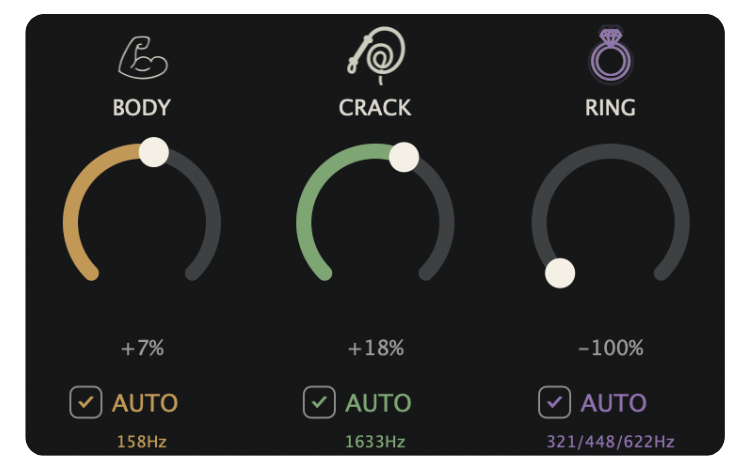
Using a high-pass filter is an EQ move to help remove excess low-end rumble. Removing frequencies in the 20–100 Hz range can remove any excess rumble and bleed from the kick drum or toms. In RC SNARE, when you enable AUTO on the BODY control, it automatically measures your recording and places the appropriate low-pass filter for you (we’re lookin' out for ya!).
Remove Ring and Excess Resonance
Excess ring is tricky; snare drums are inherently ringy with overtones. For more info, we have a detailed article to explain this phenomenon and what to do about it. But generally, ringing overtones happen in the range of 200–800 Hz at intervals above the drum’s fundamental frequency. If you don’t want to use a frequency analyzer and pick out individual frequencies that could potentially damage your tone, RC RING and the RING function in RC SNARE do this automatically.
Remove Cymbal Bleed and Harshness
When EQ’ing a snare drum, there is always a balance between adding high-frequency brightness above 10 kHz to the drum and having that EQ move add harshness from cymbal bleed. Generally, using a shelf-style EQ to reduce high frequencies above 10 kHz can be helpful. In RC SNARE, the AIR function is strategically placed at the end of the signal chain so that, after all processing, you can either increase or decrease the brightness of the drum to taste.
Thicken the Body for Warmth
Now that you’ve taken out the bad frequencies, it’s time to focus on increasing the good ones. The body of the drum is somewhere between 100–300 Hz, depending on how high or low the drum is tuned. Increasing these frequencies can add weight and thickness to the drum. In RC SNARE, BODY is designed to add that weight, and AUTO tech measures exactly where that weight is coming from to give you direct control of the thickness of your snare tone.
Add Crack to Cut Through
Crack is that mid-high-end sound that makes snare drums cut through the mix. This generally takes place between 2 kHz and 5 kHz, depending on how the drum is tuned and what sort of muffling was used. This is an important frequency range because it is also an important area for vocals and guitars in the mix, so be careful with too much movement here. RC SNARE has a CRACK control that allows you to easily adjust this important area of your tone.
Add Air to Brighten
Back to our high-frequency friend AIR, adding in high-end above 10 kHz can really help bring a snare drum to life, especially after a lot of dark compression from something like PUNCH. In RC SNARE, AIR also adds a bit of analog harmonic warmth with tube and transformer overtones to make the high-frequency boost sound more musical and less harsh.
This is just the foundation. Test out all of these different EQ moves for yourself using a standard graphical EQ or a console-style EQ like an SSL 4000. Don’t be afraid of using too much; experiment and listen for yourself. If you just want to get great drum tones quickly, without all the graphs and knobs, download RC SNARE.